
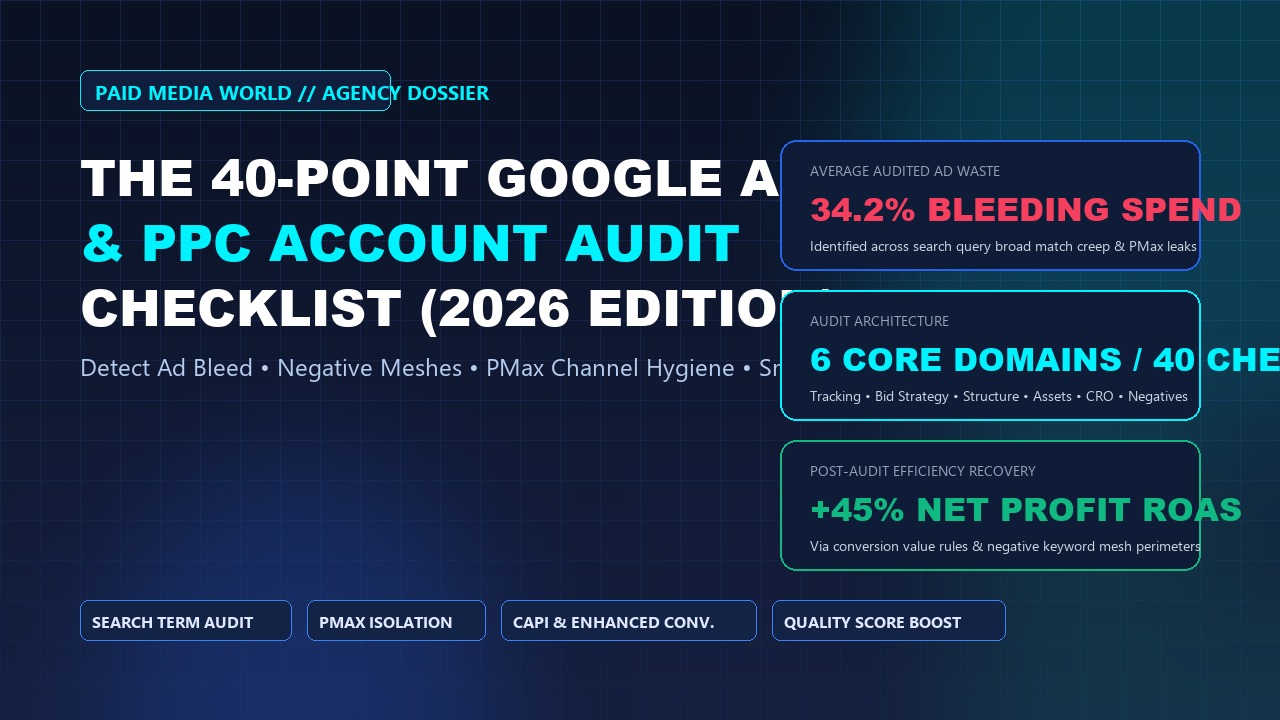
Over the past decade auditing hundreds of enterprise Google Ads accounts across D2C eCommerce, B2B SaaS, and high-ticket service verticals, one persistent reality stands out: more than 85% of active accounts bleed between 20% and 45% of their monthly media spend through undetected structural leaks, loose match types, automated bidding traps, and corrupted tracking pipelines.
Junior media buyers often treat Google Ads optimization as a routine check of "Recommendations" tabs—blindly applying auto-apply suggestions that serve Google's ad revenue rather than your bottom line. Senior performance practitioners know that an authentic PPC audit is an forensic investigation into auction mechanics, search intent leakage, algorithmic throttling, and net contribution margins.
This 40-point agency audit checklist is our operational blueprint. Use it to diagnose underperforming accounts, recover wasted capital, and establish scalable scaling foundations.
The 6 Inspection Domains
Domain 1: Account Architecture & Structural Governance (Points 1–7)
Point 1: Auto-Apply Recommendations Trap
Severity: CriticalCheck Recommendations > Auto-apply. If options like "Add new keywords", "Use optimized targeting", or "Expand your reach with Google Search partners" are toggled ON, Google's algorithms are silently injecting untargeted broad keywords and adjusting bids without human oversight. Ensure all speculative auto-apply toggles are disabled immediately.
Point 2: Geographic Location Option Hygiene
Severity: CriticalVerify campaign location target settings. Google defaults to "Presence or interest: People in, regularly in, or who've shown interest in your targeted locations". This silently bleeds spend to international clicks from users merely researching your country. Every campaign must be strictly set to "Presence: People in or regularly in your targeted locations".
Point 3: Search Partners & Display Network Bleed in Search
Severity: HighIn standard Search campaigns, segment data by Network (with search partners). Google Search Network Display Expansion frequently consumes 10%–25% of Search budgets on low-intent mobile gaming banners and ad networks with near-zero conversion intent. Disable "Include Google Display Network" on all pure Search campaigns.
Point 4: Campaign Objective & Bid Strategy Consistency
Severity: MediumAudit whether campaigns are configured without goals or assigned improper objectives. If an e-commerce campaign targeting ROAS is set to "Maximize Clicks", Smart Bidding will aggressively buy the cheapest, lowest-intent desktop impressions rather than purchasers.
Point 5: Campaign Granularity vs. Data Fragmentation
Severity: HighCheck monthly conversion volume per campaign. Modern Smart Bidding algorithms require a minimum of 30–50 conversions per month per bid strategy to exit learning mode. Accounts fragmented into 40 tiny campaigns with 3 conversions each suffer perpetual bid volatility. Consolidate into structured clusters or utilize Portfolio Bid Strategies.
Point 6: Brand vs. Non-Brand Budget Isolation
Severity: CriticalNever combine brand search queries with generic non-brand keywords in the same campaign. Brand search artificially inflates campaign ROAS (e.g., reporting 8x ROAS while non-brand is losing money at 0.7x), hiding massive capital erosion from leadership.
Point 7: Currency, Time Zone & Billing Verification
Severity: MediumEnsure account time zone aligns with your primary CRM or e-commerce store time zone to prevent day-parting attribution discrepancies, and confirm that automated payment methods have backup cards configured to avoid sudden billing holds.
Domain 2: Search Intent Hygiene & Negative Keyword Meshes (Points 8–14)
Point 8: Search Terms Report Scrutiny (The 90-Day Bleed Check)
Severity: CriticalDownload the Search Terms report for the last 90 days. Filter for queries with > 5 clicks and 0 conversions. In neglected accounts, this reveals thousands of dollars spent on queries completely outside commercial intent (e.g., technical support queries, login portals, DIY tutorials).
Point 9: Universal Negative Keyword List Implementation
Severity: CriticalAudit shared negative keyword lists at the account level. Verify active exclusion of universal waste terms: "free, crack, torrent, jobs, salary, careers, resume, meaning, definition, wholesale, cheap, login, portal".
Point 10: Match Type Cannibalization & Broad Match Runaway
Severity: HighBroad Match in 2026 relies heavily on user search history and landing page semantics. When running Broad Match alongside Exact Match, ensure high-converting Exact Match terms are added as exact negative keywords in Broad campaigns to prevent Broad from stealing historical conversion signals.
Point 11: Close Variant Audit
Severity: HighGoogle's "Exact Match" now matches queries that algorithms deem to share the "same meaning". Inspect exact match search terms to detect close variant drift where Google matched queries with completely different user intent.
Point 12: Cross-Campaign Negative Keyword Sculpting
Severity: MediumEnsure upper-funnel generic campaigns explicitly exclude your product-specific, high-intent BoFu keywords, forcing auctions into the exact ad group and landing page tailored for that searcher.
Point 13: Competitor Bidding Segmentation
Severity: MediumIf bidding on rival brand keywords, verify they are cordoned into a dedicated Competitor Conquesting campaign with custom comparison landing pages and distinct tCPA targets.
Point 14: Negative Keyword Conflict Checks
Severity: CriticalRun Google's negative keyword conflict tool to verify that an over-zealous phrase or broad negative keyword hasn't blocked your primary revenue-driving exact keywords from entering the auction.
Domain 3: Performance Max (PMax) Deconstruction & Asset Hygiene (Points 15–21)
Point 15: Final URL Expansion Leakage
Severity: CriticalInspect PMax settings. If "Final URL expansion" is toggled ON, Google can dynamically redirect ad clicks to blog posts, privacy policies, terms of service, or career pages. Toggle it OFF or apply strict URL exclusion rules.
Point 16: Account-Level Brand Exclusion Lists in PMax
Severity: CriticalWithout a Brand Exclusion list applied, PMax will systematically bid on your brand name, claiming easy brand conversions and reporting an inflated 7x–10x ROAS while delivering near-zero incremental acquisition.
Point 17: PMax Channel Spend Deconstruction
Severity: HighUtilize Google Ads PMax scripts to deconstruct where your budget is actually dispersing across Shopping, Search, Video, and Display channels (refer to our complete PMax Deconstruction Guide).
Point 18: Auto-Generated Video Replacement
Severity: HighIf you do not upload dedicated horizontal, vertical, and square video assets to an Asset Group, Google will automatically synthesize a low-quality slideshow video with robotic voiceovers and distribute it across YouTube and Display. Always upload custom, professionally produced video assets.
Point 19: Merchant Center Product Title & Attribute Optimization
Severity: HighFor eCommerce accounts, verify product feed health. Are titles formatted with high-intent keywords (Brand + Product Type + Gender + Size + Color)? Are GTINs/MPNs valid? Missing product identifiers cripple Shopping auction eligibility.
Point 20: First-Party Audience Signals Strength
Severity: MediumEnsure PMax asset groups are seeded with robust first-party audience signals: customer match lists (high LTV purchasers), GA4 purchase cohorts, and custom search intent segments (users searching your top 10 commercial keywords).
Point 21: Asset Group Granularity
Severity: MediumAvoid dumping 500 diverse product SKUs into a single PMax Asset Group. Segment asset groups by product category or margin tier so headlines, imagery, and landing pages remain tightly relevant.
Domain 4: Conversion Tracking & Data Infrastructure (Points 22–28)
Point 22: Primary vs. Secondary Conversion Action Governance
Severity: CriticalInspect Goals > Conversions > Summary. Only genuine bottom-of-funnel business actions (Purchases, Qualified Lead Forms, Booked Calls) should be marked as "Primary". If soft actions like "Add to Cart", "Pageview", or "Time on Site > 2 mins" are marked Primary, Smart Bidding will aggressively optimize for worthless browsing.
Point 23: Enhanced Conversions Verification
Severity: CriticalVerify Enhanced Conversions status in Google Ads diagnostics. With third-party cookie phaseouts and Safari ITP restrictions, Enhanced Conversions hashes first-party customer data (SHA-256 email, phone, address) to recover 5%–15% of lost conversion volume.
Point 24: Conversion Deduplication & Transaction ID Passing
Severity: Critical
For eCommerce accounts, inspect whether purchase conversion tags pass unique transaction_id parameters. Without transaction IDs, when a customer refreshes their order confirmation page, Google records duplicate purchase conversions, massively corrupting ROAS.
Point 25: Attribution Model Alignment (Data-Driven vs. Last-Click)
Severity: HighEnsure all primary conversion actions utilize Data-Driven Attribution (DDA) rather than archaic First-Click or Last-Click models. DDA distributes credit algorithmically across touchpoints, preventing premature pausing of high-assist mid-funnel campaigns.
Point 26: Offline Conversion Tracking (OCT) with GCLID & WBRAID
Severity: HighIn B2B lead generation, raw form fills are often spam or unqualified. Verify that your CRM (HubSpot, Salesforce) syncs offline pipeline stage changes (MQL → SQL → Closed-Won) back to Google Ads using GCLID, GBRAID, or WBRAID identifiers.
Point 27: Conversion Value Rules Configuration
Severity: MediumUtilize Google Ads Conversion Value Rules to instruct algorithms to bid more aggressively on high-margin audiences (e.g. multiply conversion value by 1.3x for returning customers or high-tier metropolitan ZIP codes).
Point 28: GA4 Data Stream & Consent Mode v2 Compliance
Severity: Medium
Verify Google Consent Mode v2 implementation (ad_storage, ad_user_data, ad_personalization). Missing consent signals prevent audience remarketing lists from populating in European and global jurisdictions.
Domain 5: Smart Bidding Strategy & Auction Economics (Points 29–35)
Point 29: Unrealistic Target CPA / Target ROAS Settings
Severity: CriticalA frequent agency mistake is setting a target ROAS of 600% when the historical baseline is 280%. The bidding algorithm responds by choking impression volume and only entering uncompetitive, low-volume auctions. Target ROAS should be calibrated within ±15% of historical 30-day realized performance before stepping up gradually.
Point 30: Budget Pacing & The 20% / 72-Hour Scaling Law
Severity: HighCheck bid strategy change history. Sudden budget increases exceeding 20% reset the machine learning model, throwing campaigns into volatile learning phases. Scale budgets incrementally by ≤ 20% every 72 hours.
Point 31: Impression Share Diagnostics (Lost IS Budget vs. Lost IS Rank)
Severity: HighAnalyze competitive metrics. If Search Lost IS (Budget) > 25%, your campaign is profitable but artificially capped by insufficient daily budget. If Search Lost IS (Rank) > 40%, your bids or ad Quality Scores are uncompetitive, requiring asset restructuring or target CPA loosening.
Point 32: Bid Adjustments Clashing with Smart Bidding
Severity: MediumWhen using Target CPA, device bid adjustments modify your target CPA rather than your base bid. Ensure media buyers haven't set conflicting device bid adjustments (-50% mobile) that accidentally cut your CPA target in half, killing mobile volume.
Point 33: Maximum CPC Caps in Portfolio Strategies
Severity: MediumIn competitive B2B or legal auctions, automated bidding can unpredictably spike individual clicks to $80+. Utilize Portfolio Bid Strategies with maximum CPC bid limits to establish hard guardrails against auction volatility.
Point 34: Auction Insights Overlap Analysis
Severity: MediumInspect Auction Insights reports over 30, 60, and 90-day windows. Identify which competitors are aggressively increasing impression share or outranking share, signaling aggressive pricing pressure or promotional campaigns.
Point 35: Seasonality Adjustments for Flash Sales
Severity: MediumFor major short-term promotional bursts (Black Friday, 48-hour flash sales), apply Google Ads Seasonality Adjustments. This informs Smart Bidding of an expected temporary conversion rate surge (≥ 30%) without corrupting post-event bidding behavior.
Domain 6: Creative Assets, Quality Score & CRO Quality (Points 36–40)
Point 36: Responsive Search Ad (RSA) Asset Density & Pinning Hygiene
Severity: CriticalEnsure each RSA leverages 12–15 distinct headlines and 4 descriptions. Avoid the rookie mistake of pinning headlines to Position 1 across every variant, which disables Google's combinatorial testing algorithms and drops Ad Strength to "Poor".
Point 37: Complete Ad Asset (Extensions) Coverage
Severity: HighAssets significantly expand SERP pixel real estate and directly improve Ad Rank. Every campaign must deploy: Sitelinks (min 4 with descriptions), Callouts (min 4), Structured Snippets, Image Assets, Call Assets, and Business Logo/Name verification.
Point 38: Quality Score Component Dissection
Severity: HighIsolate keywords with Quality Score ≤ 5. Deconstruct the three underlying pillars: Expected CTR, Ad Relevance, and Landing Page Experience. A low Expected CTR requires ad copy testing; a low Landing Page Experience requires message match and Core Web Vitals optimization.
Point 39: Landing Page Mobile Speed & INP Responsiveness
Severity: HighEvery 100ms delay in mobile landing page loading drops conversion rates by 7%. Run PageSpeed Insights on all ad landing pages to verify healthy Interaction to Next Paint (≤ 200ms) and LCP (≤ 2.5s) (see our INP PPC Optimization Guide).
Point 40: Message Match & Offer Continuity
Severity: CriticalAudit the exact promise made in your ad headline against the primary H1 header above the fold on the landing page. If an ad promises "Save 30% on ERP Software" and the landing page merely displays a generic home page hero, conversion rates collapse by over 60%.
Master Audit Scorecard & Prioritization Matrix
| Checklist Focus Area | Checks | Immediate Waste Risk | Expected ROAS Recovery |
|---|---|---|---|
| Architecture & Governance | Points 1–7 | 15%–30% Ad Bleed | +20% Efficiency |
| Search Terms & Negatives | Points 8–14 | 20%–40% Wasted Spend | +35% Lead Quality |
| Performance Max & Feed | Points 15–21 | Brand Cannibalization | Real Incremental ROAS |
| Tracking & Infrastructure | Points 22–28 | Double Counting / Blind Bidding | True Conversion Value |
| Smart Bidding & Economics | Points 29–35 | Auction Throttling | Scalable Scaling Pacing |
| Creative, Assets & CRO | Points 36–40 | High CPCs & Low CVR | -25% Blended CPA |
Stop Wasting Paid Media Capital
Want senior performance marketing practitioners to audit your Google Ads and Meta Ads accounts? Request a forensic ad spend audit from Paid Media World.
The 40-Point Google Ads & PPC Account Audit C: Frequently Asked Questions
How frequently should a Google Ads audit be conducted?
A comprehensive 40-point technical audit should be executed quarterly for accounts spending over $10,000/month. Search terms and negative keyword hygiene should be audited on a bi-weekly cadence to catch semantic search creep early.
Can an audit be conducted without disrupting live campaign learning?
Yes. An audit is an observational analysis that requires read-only access to your Google Ads account, Google Tag Manager container, and GA4 property. Active campaigns continue operating without interruption.
What is the single most common cause of wasted Google Ads spend?
The combination of unmonitored Broad Match keywords paired with default "Presence or Interest" location targeting and the absence of account-level negative keyword perimeters. This combination routinely accounts for 30%+ of total account spend on completely irrelevant clicks.
Google Ads Account Audit Checklist: 2026 Inspection SOP
Deploy this streamlined google ads audit checklist 2026 quarterly to eliminate wasted budget and detect account anomalies:
- Search Terms Report Inspection: Sort search terms by spend with 0 conversions over the past 60 days. Add non-performing search queries to account-level negative lists.
- Match Type Bleed Check: Verify that Broad match keywords are paired exclusively with Smart Bidding (Target CPA / Target ROAS) and never run on Manual CPC.
- Enhanced Conversions & Consent Mode v2: Validate that Google Consent Mode v2 is actively passing
ad_storageandad_user_dataparameters to maintain conversion model accuracy. - Asset Strength & Ad Relevance: Ensure all Responsive Search Ads feature "Good" or "Excellent" strength with at least 8 unique headlines and 3 descriptions.