
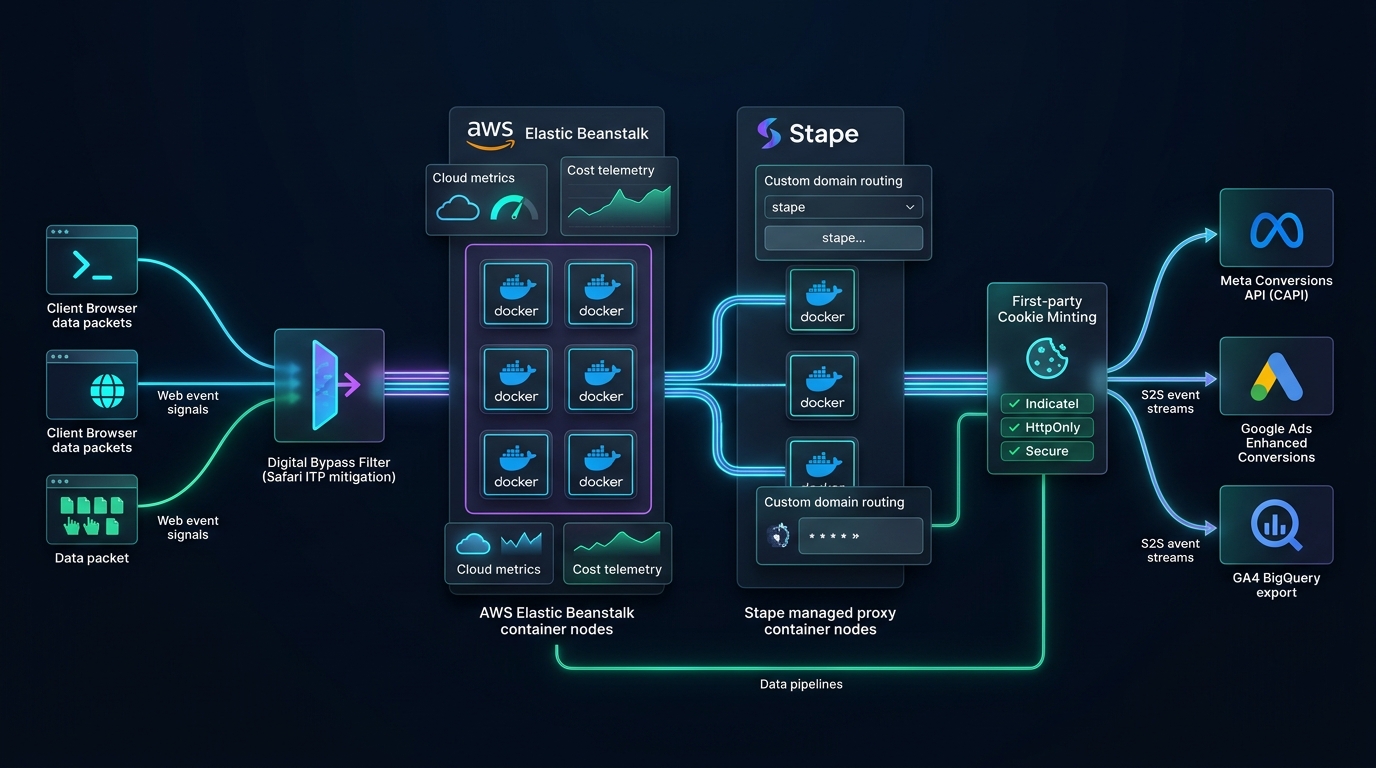
Client-side conversion tracking is structurally impaired in 2026. Between Apple's Safari Intelligent Tracking Prevention (ITP) capping client-side cookies at 7 days (and 24 hours with link parameters), modern ad-blockers intercepting 25%–35% of browser JavaScript requests, and iOS Private Relay obfuscating IP addresses, brands relying on conventional client-side pixels are operating with 20%–40% under-reported conversion data. Server-Side Google Tag Manager (sGTM) has transitioned from an enterprise luxury into a required performance marketing infrastructure component.
Quick Verdict: AWS Elastic Beanstalk vs. Stape.io for sGTM
For 90% of DTC brands and media buying agencies spending under $250k/mo, Stape.io is the superior operational choice due to automated custom domain SSL, pre-built custom loaders that evade ad blockers, and fixed predictable pricing ($20–$100/mo). For enterprise organizations requiring strict multi-tenant IAM security, zero third-party data processing, and custom VPC governance, AWS Elastic Beanstalk (or GCP Cloud Run) remains the compliance standard.
1. The Mechanics: How sGTM Defeats Safari ITP and Ad Blockers
When a browser loads a traditional Meta Pixel or Google Analytics script from connect.facebook.net or googletagmanager.com, two major obstacles arise:
- Client-Side Cookie Degradation: Safari’s ITP engine detects that cookies are set via JavaScript (
document.cookie) and forcibly restricts their lifespan to 7 days (or 24 hours if incoming traffic contains tracking click IDs likefbclidorgclid). When a user converts on Day 10, attribution is permanently severed. - Browser Ad-Blocker Interception: Extensions like uBlock Origin, Brave Browser, and AdGuard maintain domain blocklists that intercept third-party tracking calls before the server ever receives the packet.
The Server-Side Solution: By provisioning an sGTM container hosted at your own custom subdomain (e.g., data.yourdomain.com), all web events are dispatched as first-party HTTP POST requests. The server container receives the raw payload, sets a cryptographically secure, HttpOnly, SameSite=Lax server cookie with an authentic 1-year expiration date, and forwards the event server-to-server to Meta CAPI and Google Ads Enhanced Conversions.
2. Deep Technical Breakdown: AWS Elastic Beanstalk vs. Stape.io
Architecture A: AWS Elastic Beanstalk / Google Cloud Run
Google Tag Manager provides a native automated deployment wizard for Google Cloud Platform (App Engine / Cloud Run) and an official Docker image (gcr.io/cloud-tagging-10302018/gtm-cloud-image:stable) compatible with AWS Elastic Beanstalk.
The AWS Advantage: Direct infrastructure ownership. Data never passes through an intermediary proxy company. You can integrate AWS CloudFront to cache static GTM library files at the edge, drastically reducing server latency to under 35ms globally.
The AWS Drawback: High operational maintenance. You are responsible for SSL certificate renewals via AWS Certificate Manager, Docker image version patching, CloudWatch monitoring, and auto-scaling rules to prevent node crashes during flash sales.
Architecture B: Stape.io Managed Infrastructure
Stape is a specialized cloud hosting provider built exclusively for Server-Side GTM. It automates container provisioning across AWS, GCP, and DigitalOcean data centers in both North America and Europe.
The Stape Advantage: Zero DevOps overhead. Stape provides automatic SSL generation for custom domains, automated image updates, and proprietary features like the Custom Web Loader (which dynamically renames the client-side gtm.js filename and paths on every request, rendering ad-blocker domain filters ineffective).
3. Step-by-Step Implementation: Configuring Meta CAPI & Enhanced Conversions
- Create Server Container in GTM: Navigate to your GTM Account > Admin > Create Container > Server. Choose "Manually provision tagging server" to copy your Container Config string.
-
Configure DNS First-Party Subdomain: In your DNS provider (Cloudflare, GoDaddy, AWS Route 53), add a CNAME record:
Type: CNAME | Name: data | Value: your-container-id.stape.io (or AWS ELB endpoint) | Proxy: DNS Only (Grey Cloud)
-
Update Web GTM Transport URL: In your existing Web GTM Container, update the Google Tag (GA4 Configuration tag) with the configuration parameter:
server_container_url: https://data.yourdomain.com. -
Deploy Meta Conversions API Tag: In the Server GTM container, install the official Conversion API by Meta tag template. Map event names (
Purchase,AddToCart,Lead) and pass customer data parameters (hashed email, phone, external ID, IP address, and user agent). -
Set Up Event Deduplication: Ensure both your browser pixel and server tag pass identical
event_idvalues generated via a custom JavaScript variable (e.g., timestamp + random integer). Meta automatically deduplicates twin signals while preserving 100% data fidelity.
4. Cloud Cost Optimization Blueprint: Keeping Server Fees Under $15/Mo
A common trap media buyers face with server-side tagging is unexpected cloud bills caused by infinite logging or excessive container instances. Follow these cost-control rules:
- Turn Off Debug Logging in Production: In Google Cloud Run or AWS Beanstalk, set the environment variable
RUN_GTM_IN_DEBUG_MODE = false. Storing gigabytes of request logs in CloudWatch or Cloud Logging accounts for over 40% of standard AWS tagging costs. - Implement Edge Caching: Route your tagging subdomain through Cloudflare with Cache Rules enabled for
/gtm.jsand/gtag.js. Serving the client script from Cloudflare's free edge network prevents millions of static hits from reaching your paid compute instances. - Scale on CPU Rather Than Request Count: Set your auto-scaling policy to spin up secondary Docker instances only when CPU utilization sustains > 65% for 3 consecutive minutes, rather than bursting on brief traffic spikes.
Frequently Asked Questions: Server-Side GTM
Does Server-Side GTM eliminate the need for the browser pixel?
No. The industry standard in 2026 is Hybrid Redundant Tracking. Running both browser pixels and server CAPI with identical event_id parameters provides maximum resilience. If an ad-blocker strips the browser call, the server stream delivers the conversion; if a network error halts the server, the browser covers the gap.
What is an ideal Event Match Quality (EMQ) score on Meta?
With proper server-side hashing of first-party identifiers (email, phone, fbp, fbc, IP, and user-agent), your Meta Event Match Quality score should sit between 8.2/10 and 9.5/10 for purchase and lead events, ensuring optimal Smart Bidding feedback.
Is sGTM compliant with GDPR and the EU AI Act?
Yes, in fact it offers superior compliance control. Unlike browser pixels that can leak sensitive URL strings to third parties, sGTM acts as a data gatekeeper. You can programmatically scrub PII, strip query strings, and enforce consent mode states before data leaves your server.