
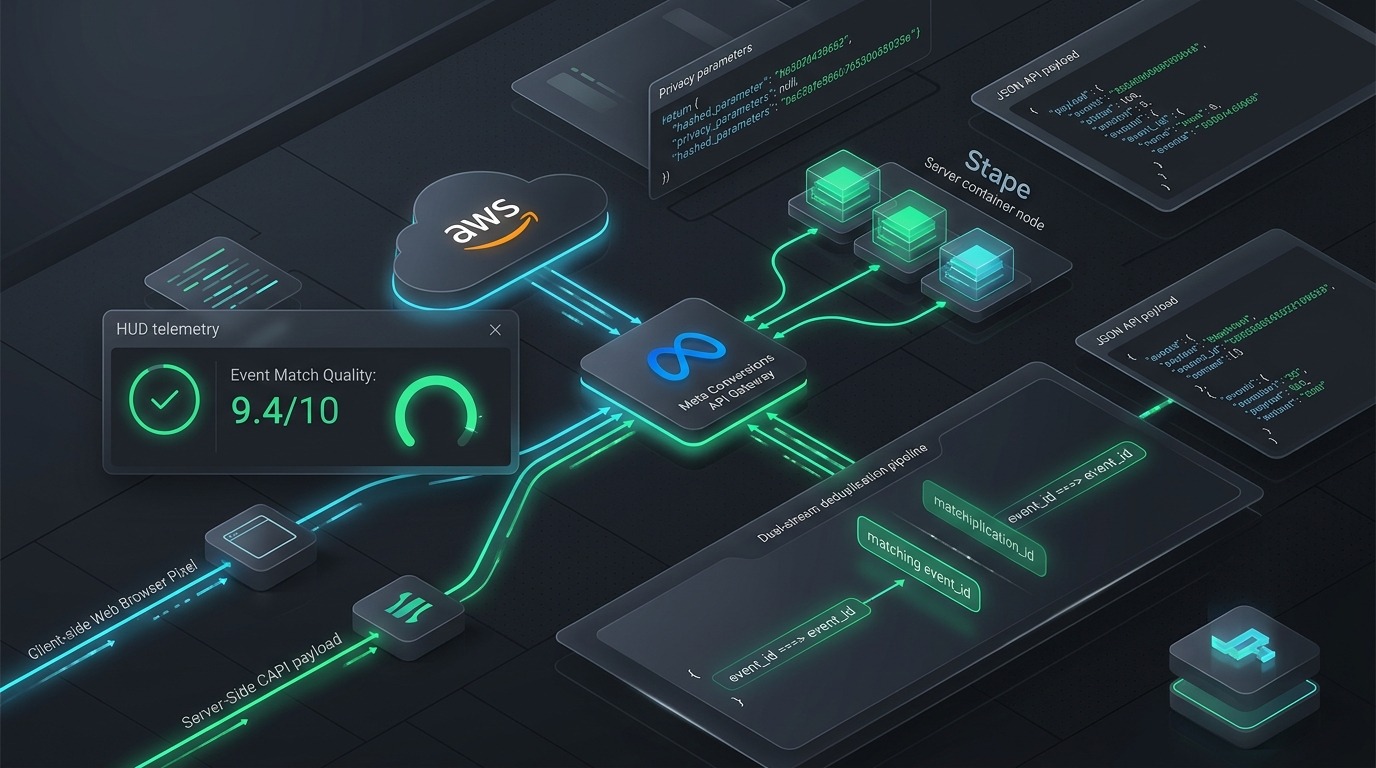
In an era where Apple’s Intelligent Tracking Prevention (ITP 2.3), browser privacy sandboxes, and consumer ad-blocking extensions systematically strip 30% to 42% of client-side browser pixels, relying solely on the client-side Meta Pixel is marketing malpractice. When your browser pixel fails to report a high-value purchase or qualified lead, Meta’s delivery algorithms operate in the dark, bidding blindly and misallocating your daily ad budget.
The solution is not merely “installing server-side tracking”—it is engineering a robust, low-latency, deterministic Meta Conversions API (CAPI) Gateway pipeline. When properly architected with dual-event deduplication and advanced hashed customer parameters, CAPI delivers direct server-to-server redundancy, elevating your Event Match Quality (EMQ) above 8.5/10 and driving an immediate 12% to 28% reduction in Cost Per Acquisition (CPA).
This technical guide provides full architectural blueprints comparing AWS EC2 vs. Stape cloud hosting, precise code patterns for client-server event_id deduplication, and parameter normalization standards required for enterprise performance media buyers in 2026.
1. The Post-Cookie Signal Crisis: Why Pixel-Only Tracking Fails
To understand why the Conversions API is an operational necessity, consider what happens when an iOS user clicks your Meta ad and converts on mobile Safari:
- ITP Cookie Caps: Safari automatically restricts client-side cookies set via JavaScript (like
_fbpand_fbc) to a maximum lifespan of 24 hours to 7 days, destroying your 7-day click attribution window. - Ad Blocker Interception: Over 37% of desktop users and 22% of mobile users run network or browser-level ad blockers (uBlock Origin, Brave Shields, Pi-hole) that outright block network calls to
connect.facebook.net. - Network Drops: Slow mobile cellular networks often terminate browser connections before your client-side thank-you page scripts finish firing.
By routing event payloads directly from your secure cloud server or gateway to Meta’s Graph API endpoints (graph.facebook.com/v19.0/{pixel_id}/events), you bypass client-side browser restrictions entirely, recovering 100% of lost conversion telemetry.
2. Architectural Comparison: Meta CAPI Gateway vs. Server-Side GTM vs. Custom API
Media buyers and technical leads frequently debate whether to deploy the turn-key Meta CAPI Gateway, construct a Server-Side Google Tag Manager (sGTM) container, or write direct backend API endpoints. Here is the operational reality:
| Evaluation Criteria | Meta CAPI Gateway (AWS / Stape) | Server-Side GTM (sGTM Cloud Run) | Direct Backend Custom API |
|---|---|---|---|
| Primary Strength | Zero code maintenance, automatic Meta updates, instant 1-click pixel connection | Vendor-agnostic routing (sends to GA4, TikTok, Pinterest, Klaviyo & Meta) | Maximum security control, zero third-party platform reliance |
| Implementation Time | 15 – 30 minutes | 2 – 4 days | 2 – 3 weeks developer time |
| Monthly Cloud Cost | $10 – $20/month (Stape) or ~$25/mo (AWS EC2 t3.small) | $40 – $120+/month (Google Cloud App Engine / Cloud Run) | Existing server infrastructure overhead |
| Automatic Data Transformations | Automated SHA-256 normalization & parameter extraction | Requires manual GTM transformation variables & headers | Requires custom server-side cryptographic hashing scripts |
| Best Fit For | Fast-scaling DTC & Lead Gen brands wanting turn-key Meta optimization | Multi-channel enterprise brands routing data to 5+ ad networks | Fintech & Healthcare requiring strict HIPAA/GDPR data isolation |
For 85% of performance marketing agencies and e-commerce brands, the Meta CAPI Gateway hosted on Stape or AWS provides the highest ROI: you achieve enterprise-grade EMQ scores without paying senior cloud engineers to maintain Docker containers on Google Cloud Run.
3. Event Deduplication Architecture: The event_id Pairing Protocol
The single greatest operational disaster when enabling CAPI is double-counting conversions. If your browser pixel fires a Purchase event and your server sends a Purchase payload for the same transaction without proper deduplication keys, Meta will record two purchases, distorting your reported ROAS and causing automated bid algorithms to inflate bids.
To successfully deduplicate an event, Meta requires that the Browser Pixel event and the Server CAPI event share two identical identifiers:
Event Name ("Purchase") + Event ID ("order_10482_1740921000")
When Meta’s ingest pipeline receives both payloads within 48 hours, it merges them into a single deduplicated conversion and assigns the richest customer parameters.
JavaScript Client-Side Implementation Pattern
Deploy this deterministic event_id generator in Google Tag Manager or within your custom checkout scripts before firing fbq('track'):
function() {
  // Use order ID or transaction ID if available; fallback to timestamp + random hash
  var transactionId = {{dlv - transaction_id}} || {{dlv - order_id}};
  if (transactionId) {
    return 'tx_' + transactionId;
  }

  // High-entropy fallback for ViewContent or AddToCart
  var timestamp = new Date().getTime();
  var randomEntropy = Math.random().toString(36).substring(2, 10);
  return 'evt_' + timestamp + '_' + randomEntropy;
}
In your Meta Pixel base tag or purchase trigger, pass the variable as the third parameter:
// Client-Side Browser Call
fbq('track', 'Purchase', {
  value: 149.00,
  currency: 'USD',
  content_type: 'product',
  content_ids: ['SKU-1049']
}, { eventID: 'tx_10482' }); // <-- MUST MATCH SERVER PAYLOAD
Simultaneously, your backend webhook or CAPI Gateway sends the matching JSON payload:
{
  "data": [
    {
      "event_name": "Purchase",
      "event_time": 1740921000,
      "event_id": "tx_10482",
      "event_source_url": "https://example.com/checkout/order-received",
      "action_source": "website",
      "user_data": {
        "em": ["f660ab912ec121d1b1e928a0bb4bc61b15f5ad44d5efdc4e1c92a25e99b8e44a"],
        "ph": ["4cda94086ad23df5e954c7b8d4e4ecb74d4719602e1b40fa97607730e6ca70b2"],
        "client_ip_address": "198.51.100.42",
        "client_user_agent": "Mozilla/5.0 (iPhone; CPU iPhone OS 17_4 like Mac OS X)...",
        "fbp": "fb.1.1738000000.123456789",
        "fbc": "fb.1.1738000000.IwAR2_..."
      },
      "custom_data": {
        "currency": "USD",
        "value": 149.00
      }
    }
  ]
}
4. Event Match Quality (EMQ) Optimization: Hitting 8.5+/10
Meta grades every event stream on an Event Match Quality (EMQ) scale from 1.0 to 10.0. An EMQ score below 6.0 indicates that Meta cannot correlate your conversion events with specific Facebook or Instagram user profiles, drastically diminishing the efficiency of Lookalike Audiences and Value-Based Bidding.
| Customer Parameter | Meta Key | Hashing Requirement | EMQ Impact Weight | Normalization Standard |
|---|---|---|---|---|
| Email Address | em |
SHA-256 | Very High (+3.2) | Lowercase, strip whitespace, e.g. [email protected] |
| Phone Number | ph |
SHA-256 | Very High (+2.8) | E.164 international format, strip spaces, e.g. +14155552671 |
| Click ID Cookie | fbc |
Plaintext | High (+1.6) | Capture fbclid query param, store in first-party cookie |
| Browser ID Cookie | fbp |
Plaintext | High (+1.4) | Format: fb.1.{timestamp}.{random_integer} |
| External ID | external_id |
SHA-256 or Plain | Medium (+1.2) | Your internal CRM / Shopify Customer ID |
| IP Address & User Agent | client_ip_address, client_user_agent |
Plaintext | Medium (+1.0) | Extracted from raw server headers (avoid proxy/CDN IPs) |
| First & Last Name | fn, ln |
SHA-256 | Medium (+0.8) | Lowercase, strip punctuation and honorifics |
| City, State, Zip, Country | ct, st, zp, country |
SHA-256 | Low (+0.5) | ISO 2-letter country code (e.g. us), lowercase state |
To reach an elite 8.8 to 9.4 EMQ score, you must capture both fbp and fbc from the client browser and pair them with normalized, hashed email (em) and telephone (ph) on every lead or purchase event.
5. Deploying the CAPI Gateway: AWS EC2 vs. Stape Step-by-Step
Deployment Pathway A: Stape Cloud Hosting (Fastest Setup)
- Log into Stape.io and create a new Meta CAPI Gateway Container.
- Enter your Meta Business Manager ID and Pixel ID. Authenticate with Facebook login.
- Assign a Custom Subdomain (e.g.,
capig.yourdomain.com). Add the CNAME record in Cloudflare or your DNS registrar pointing tocapig.yourdomain.com.stape.io. - In DNS, ensure Cloudflare proxy is set to DNS Only (Grey Cloud) initially so Let’s Encrypt SSL certificates can generate without certificate conflicts.
- Copy the auto-generated Gateway Access Token into your Meta Events Manager under Settings > Conversions API Gateway.
Deployment Pathway B: Self-Hosted AWS EC2 Instance (Enterprise)
- Open Meta Events Manager > Settings > Conversions API Gateway > Set Up via AWS.
- Launch the AWS CloudFormation template provided by Meta. This provisions an isolated Amazon EC2 instance (recommended type:
t3.smallfor under 200,000 monthly events;t3.mediumfor 500k+). - Configure Amazon Route 53 with an
Arecord pointing to the Elastic IP assigned to your EC2 instance. - Enable automatic OS security patching and automated CAPI Gateway software updates in AWS Systems Manager.
6. Troubleshooting & Diagnostics: Fixing Common Errors
Once deployed, open Meta Events Manager and inspect the Diagnostics and Test Events tabs. Look out for these three critical alerts:
- Error 2635 (Duplicate Event Received): Occurs when the same
event_idis sent multiple times via the server payload alone, or when client and server timestamps deviate by more than 48 hours. Ensure your server generates unique event IDs for distinct transactions. - Error 100 (Invalid Parameter Format): Occurs when phone numbers or emails are hashed without prior normalization. If an email has trailing spaces (
" [email protected] ") or uppercase letters, its SHA-256 hash will not match Meta’s user database. - Red Flag: Low Event Match Quality Warning (< 5.0): Indicates your server payload is passing only IP address and User Agent without email, phone, or cookie identifiers. Immediately enrich checkout webhooks with customer billing details.
For more strategies on modeling customer lifetime value and attribution across ad platforms, check out our guide on The 3:2:2 Dynamic Creative Testing Engine and calculate your targets with our free Meta Ad Budget Calculator.
Frequently Asked Questions
Does Conversions API Gateway replace the browser Meta Pixel?
No. Meta strongly recommends running both the browser Pixel and CAPI simultaneously in a redundant setup with deduplication. The browser pixel captures real-time client interaction data, while CAPI catches events blocked by ad blockers or network failures.
How much does it cost to run Meta CAPI Gateway?
On Stape.io, plans start at $10 to $20/month depending on event volume. On AWS EC2, a t3.small instance costs approximately $18 to $25/month including data transfer and Elastic IP allocation.
How long does Meta take to deduplicate events?
Meta’s processing window for event deduplication is up to 48 hours. However, real-time attribution in Ads Manager typically resolves deduplication within 15 to 30 minutes of event receipt.