
Topical Guide Navigation: Meta Ads Architecture
This article is a specialized technical deep-dive into manual auction pacing and algorithmic cost controls. If you are looking for our end-to-end media buying framework, explore:
- Comprehensive Strategy: The Ultimate Meta Ads Guide for Lead Generation & Sales
- Done-For-You Execution: Professional Meta Ads Management & Advantage+ Scaling Services
Scaling a winning Meta ad campaign using default Highest Volume bidding inevitably runs into the law of diminishing returns. As Meta’s auction pushes past your core audience into broader marginal inventory, CPMs and acquisition costs climb exponentially. Cost Caps and Bid Caps serve as manual circuit breakers against this algorithmic overspend, forcing Meta’s machine learning to bid strictly within your target contribution margins. In this comprehensive meta ads cost cap vs bid cap strategy guide, master the mathematical principles of auction bidding, learn when to deploy Cost Caps vs. Bid Caps, and scale e-commerce revenue without burning ad capital.
Table of Contents
- 1. Meta Bidding Strategies: Highest Volume vs. Cost Cap vs. Bid Cap
- 2. Cost Cap Mechanics: How Target CPA Averages Function
- 3. Bid Cap Mechanics: Setting Hard Auction Ceiling Limits
- 4. How to Calculate Starting Cap Amounts from Contribution Margin
- 5. Diagnosing & Fixing Campaign Under-Pacing (Budget Not Spending)
- 6. Meta Bidding Strategy Decision Matrix Table
- 7. The “Bid Cap Ladder” Advanced Scaling Architecture
- 8. Frequently Asked Questions
1. Meta Bidding Strategies: Highest Volume vs. Cost Cap vs. Bid Cap
Meta Ads offers distinct bidding controls that dictate how Meta’s delivery algorithm bids in user impression auctions:
- Highest Volume (Default): Bids aggressively to spend 100% of your daily budget, aiming to maximize conversion volume regardless of fluctuating Cost Per Acquisition (CPA).
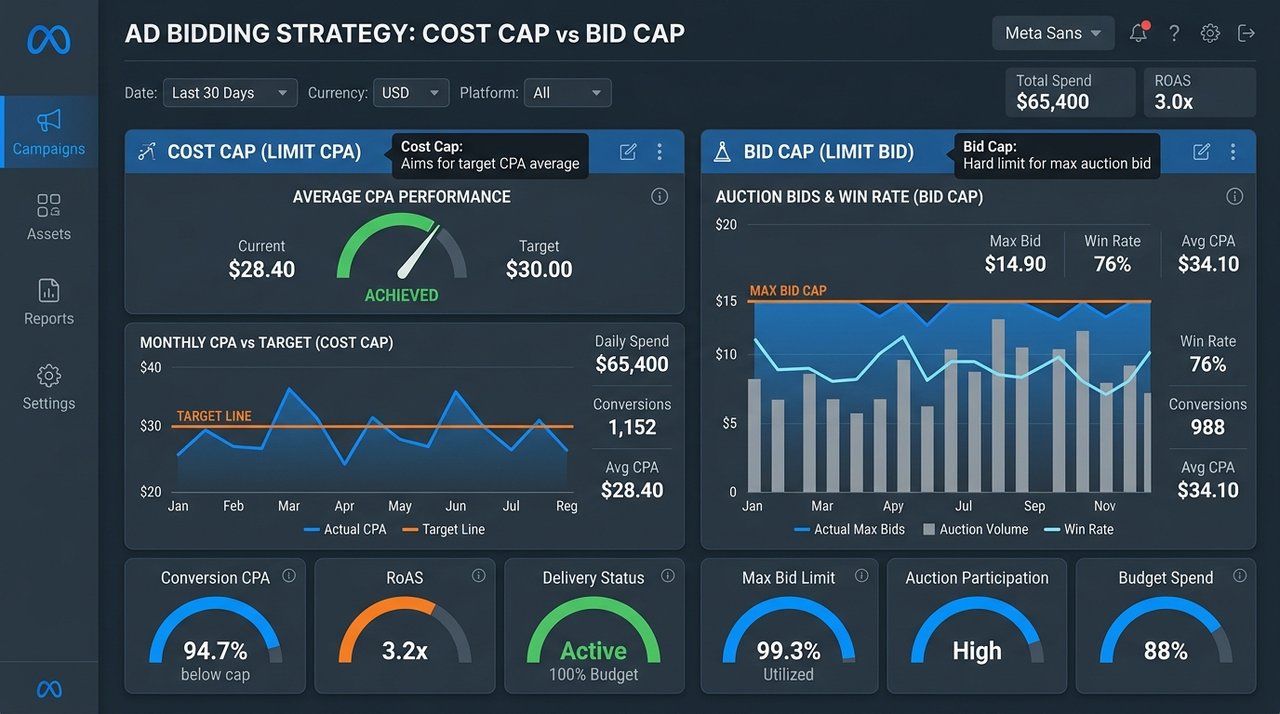
- Cost Cap (Target CPA): Instructs Meta to keep your average CPA at or below a specified target amount across the campaign reporting window.
- Bid Cap (Auction Ceiling): Sets a hard maximum bid limit for any individual auction, preventing Meta from bidding above your cap under any circumstances.
2. Cost Cap Mechanics: How Target CPA Averages Function
Unlike Bid Caps which enforce strict per-auction limits, Cost Caps operate on an average CPA smoothing model:
$$ ext{Realized Average CPA} = rac{\sum_{i=1}^{N} ext{Individual Auction CPA}_i}{N} \le ext{Target Cost Cap}$$
For example, if your Cost Cap is set to $40.00, Meta may win one conversion at $55.00 and another conversion at $25.00, achieving a compliant average CPA of $40.00.
3. Bid Cap Mechanics: Setting Hard Auction Ceiling Limits
Bid Caps are designed for sophisticated media buyers who understand their precise e-commerce customer conversion rates. Setting a Bid Cap of $15.00 guarantees that Meta will never bid more than $15.00 in any single auction.
If competitive auction pressure causes required bids to rise above $15.00, your Bid Cap campaign simply pauses delivery until auction competition cools down, protecting ad spend against runaway CPA spikes.
4. How to Calculate Starting Cap Amounts from Contribution Margin
To prevent setting caps too low (which starves campaign delivery) or too high (which invalidates cost protection), calculate your initial Cost Cap starting threshold using your product unit economics:
$$ ext{Starting Cost Cap} = ext{Average Order Value (AOV)} imes ext{Contribution Margin \%}$$
For a product with a $100.00 AOV and 55% Contribution Margin ($55.00 available profit before ads):
- Break-Even Cap: $55.00 (Zero profit, zero loss)
- Aggressive Scaling Cost Cap (1.3x Buffer): $\$55.00 imes 1.30 = \$71.50$ (Allows Meta AI to enter broader auctions while maintaining profit volume)
- Strict Target Cost Cap (20% Profit Target): $\$100.00 imes (0.55 – 0.20) = \$35.00$
5. Diagnosing & Fixing Campaign Under-Pacing (Budget Not Spending)
The most common issue with Cost Cap and Bid Cap campaigns is under-pacing—when your campaign spends only 5% or 10% of its assigned daily budget. Under-pacing indicates that your bid cap is set too low for Meta to win auctions for high-converting users.
Step-by-Step Under-Pacing Resolution Protocol
- Increase Cap Amount by 15–20%: Raise your Cost Cap gradually (e.g., from $35.00 to $42.00) until campaign daily budget spending begins to pace smoothly.
- Improve Ad Creative CTR: Higher ad CTR lowers the effective eCPM required to win Meta auctions, allowing lower bid caps to spend effectively.
- Broaden Audience Targeting: Remove narrow interest overlays to increase the available pool of low-cost auctions.
6. Meta Bidding Strategy Decision Matrix Table
| Bidding Strategy | Primary Strategic Use Case | Budget Delivery Speed | CPA Risk Level |
|---|---|---|---|
| Highest Volume | New account setup, fast creative testing | Fast (Spends 100% budget daily) | High (CPAs fluctuate during scaling) |
| Cost Cap | Maintaining target profit margins while scaling | Moderate (Paces based on CPA targets) | Low (Keeps average CPA near target) |
| Bid Cap | Aggressive scale with strict auction ceiling | Variable (Pauses when bids exceed cap) | Zero Risk (Never exceeds cap limit) |
7. The “Bid Cap Ladder” Advanced Scaling Architecture
The Bid Cap Ladder is an enterprise scaling framework where media buyers duplicate a single CBO campaign across multiple ad sets with escalating Bid Cap limits to capture all available auction inventory:
CBO Campaign Budget: $5,000/day
├── Ad Set 1: Bid Cap @ $25.00 ➔ Captures ultra-cheap low-hanging conversions
├── Ad Set 2: Bid Cap @ $30.00 ➔ Captures moderate-cost auction inventory
├── Ad Set 3: Bid Cap @ $35.00 ➔ Captures standard baseline conversion volume
└── Ad Set 4: Bid Cap @ $40.00 ➔ Captures high-intent peak auction buyers
Seasonal Bidding Nuances: Q4 BFCM Holiday Auctions vs. Q1 Reset
Auction dynamics shift dramatically across commercial cycles. During high-volatility retail windows such as Black Friday / Cyber Monday (BFCM) and Q4 peak promotional periods, Meta auction CPMs routinely surge by 50% to 120%. Under standard Highest Volume bidding, automated delivery burns through daily budgets by accepting severely inflated auction costs, rapidly eroding contribution margins. In contrast, deploying dynamic cap controls shields profitability:
- The Pre-BFCM Ramp (Early to Mid-November): Establish Cost Caps set 10% to 15% above your standard target CPA. This provides the algorithm sufficient auction headroom to capture surging early intent while preventing runaway CPM bids as retail competitors flood the ad exchange.
- Peak Holiday Trading (Thanksgiving through Cyber Week): Deploy Bid Cap Ladders with elevated target budgets. If heightened consumer purchase intent drives strong conversion rates that justify steeper CPMs, Meta’s auction engine will spend aggressively. If conversion rates dip or auction prices spike beyond your unit economics, the hard ceiling automatically chokes off delivery, preventing catastrophic margin bleed.
- The Q1 Auction Reset (Post-Holiday Clearance): As seasonal advertisers exit the market in January and CPMs plunge by 30% to 40%, reduce your Bid Caps accordingly. Test transitioning winning creative assets back to Cost Caps or Highest Volume to capture deeply discounted bottom-of-funnel demand.
50 Marketing Calculators Hub
Calculate Break-Even ROAS, Target CPA, Blended MER, and CAC Payback periods with our deterministic growth engineering tools.
Meta Ads Cost Cap vs. Bid Cap: When & Ho: Frequently Asked Questions
What is the main difference in a meta ads cost cap vs bid cap strategy guide?
Cost Cap targets an average CPA across all campaign conversions. Bid Cap sets a hard maximum bid limit per individual auction, preventing Meta from bidding higher regardless of average CPA.
Why is my Cost Cap campaign not spending any money?
A Cost Cap campaign under-paces if your cap target is set below current auction CPM market rates or if your ad creative CTR is too low to win bids.
Should I use Cost Cap or Highest Volume for new ad accounts?
Use Highest Volume for new ad accounts to generate initial conversion volume and build pixel pixel history before transitioning to Cost Cap controls.
How do I calculate my Break-Even Cost Cap?
Calculate Break-Even Cost Cap as $ ext{AOV} – ext{COGS} – ext{Fulfillment Shipping} – ext{Merchant Fees}$.
Can I change Cost Cap amounts on an active campaign?
Yes. Adjust Cost Caps in modest 10–15% increments to avoid disrupting delivery algorithms.
Does Cost Cap work with broad targeting?
Yes. Cost Cap performs exceptionally well with broad targeting, allowing Meta AI to find low-cost conversions across your entire market.
What is the minimum budget for a Bid Cap campaign?
Set daily budgets at least 5x to 10x your Bid Cap amount (e.g., $300/day for a $30 Bid Cap) to allow sufficient auction participation.
How does creative quality impact Cost Cap pacing?
Higher ad CTR and engagement lower your effective eCPM, allowing Meta to win auctions at lower bid caps and spend your full budget.
Can I combine Advantage+ Shopping Campaigns with Cost Caps?
No. Meta Advantage+ Shopping Campaigns currently support only Highest Volume bidding. Use Manual CBO for Cost Cap controls.
How often should I review Cost Cap campaign pacing?
Review Cost Cap campaign pacing daily. Raise caps by 10% if campaigns under-pace, and lower caps if average CPA exceeds profit targets.
Evaluating eCPM Auction Math in Cost Cap Delivery
Meta evaluates auction priority using the Total Value Auction Formula:
$$ ext{Total Auction Value} = ext{Advertiser Bid} imes ext{Estimated Action Rate} + ext{User Value Quality Score}$$
Raising your Estimated Action Rate through high-converting UGC video hooks increases total auction value without raising your cash bid cap.
Automating Bid Cap Adjustments via Meta Automated Rules
Set up Meta Automated Rules to automatically raise Bid Caps by 10% when daily budget spend is below 30% by 2:00 PM, guaranteeing smooth campaign pacing.
Auditing Auction Overlap & Self-Cannibalization in Cap Campaigns
When media buyers run multiple Cost Cap campaigns simultaneously targeting overlapping broad audiences, ad sets risk competing against each other in Meta’s internal auction. Check Auction Overlap inside Meta Ads Manager Inspect tool:
- Auction Overlap %: If Auction Overlap exceeds 20% between two Cost Cap campaigns, merge the ad sets or adjust bid caps to prevent self-bidding competition.
- Auction Intensity Metric: Monitors competitive CPM spikes during peak promotional hours, signaling when to raise bid cap ceilings temporarily.
Managing Bidding Strategy Transitions (Highest Volume to Cost Cap)
To transition an existing high-volume campaign to a Cost Cap strategy without disrupting active learning calibration:
- Duplicate your existing Highest Volume CBO campaign.
- Calculate your historical 30-day baseline CPA and set the new campaign Cost Cap 10% above baseline CPA.
- Allow the new Cost Cap campaign to ramp spend for 72 hours before scaling budget and pausing the legacy Highest Volume campaign.
Troubleshooting Zero Spend on New Bid Cap Ad Sets
If a newly launched Bid Cap ad set records $0.00 spend after 48 hours, apply the 3-step bid lifting rule:
- Raise the Bid Cap in +15% increments every 24 hours until impressions begin firing.
- Verify that your custom retargeting audience size is larger than 1,000 active profiles.
- Ensure pixel and CAPI conversion event triggers are firing cleanly.
How does minimum ROAS bidding differ from Cost Cap bidding?
Minimum ROAS bidding sets a dynamic return multiplier floor based on purchase revenue, whereas Cost Cap sets a static target cost per acquisition dollar limit.
Can I use Bid Caps with Dynamic Creative Optimization (DCO)?
Yes. Combining Dynamic Creative Optimization (DCO) with Bid Caps allows Meta to test headline and image combinations while maintaining strict auction cost ceilings.
Automating Bid Cap Scaling via Python Meta Ads SDK
For growth engineering teams managing large-scale DTC accounts, automate daily bid cap scaling increments using Python scripts interacting with Meta’s Facebook Business SDK:
from facebook_business.api import FacebookAdsApi
from facebook_business.adobjects.adset import AdSet

ACCESS_TOKEN = "EAAB..."
ADSET_ID = "238491029385"

FacebookAdsApi.init(access_token=ACCESS_TOKEN)

adset = AdSet(ADSET_ID)
adset_data = adset.api_get(fields=['bid_amount'])

current_bid = int(adset_data.get('bid_amount', 0))
new_bid = int(current_bid * 1.10) # 10% bid cap increase

adset.api_update(params={'bid_amount': new_bid})
print(f"Updated AdSet {ADSET_ID} Bid Cap to {new_bid} cents.")
Integrating Offline Conversions to Maintain Accurate Target Cost Caps
To ensure your Cost Cap bidding strategy evaluates real net profitability, upload CRM offline conversion events (such as completed phone orders, CRM qualified SQLs, and reduced return refunds) back to Meta via Meta Offline Conversions API:
- Match Key Hashing: Transmit hashed customer email (`em`), phone (`ph`), and client IP parameters with offline purchase event records.
- Deduplication Keys: Attach a unique
event_idto both browser pixel events and offline server events to prevent duplicate conversion reporting inside Meta Ads Manager.
Mastering these advanced Meta bidding and automated optimization workflows equips your media team to scale ad budgets with complete financial confidence.
Auditing Advantage+ Audience Constraints in Cost Cap Ad Sets
When running Cost Cap bidding controls inside Meta’s Advantage+ Audience ad set architecture, Meta uses your age, gender, and custom audience inputs as targeted suggestion signals while expanding delivery beyond defined parameters if lower CPA auctions are available elsewhere in your market.
To enforce hard audience boundaries while using Cost Caps, navigate to Ad Set Controls ➔ Audience Controls, and define hard minimum age limits, location boundaries, and custom audience exclusion rules that Meta cannot bypass.
Meta Ads Cost Cap vs. Bid Cap: When & Ho: Strategic Summary & Conclusion
Mastering a meta ads cost cap vs bid cap strategy guide protects your business from runaway customer acquisition costs during budget scaling. Implementing disciplined bid caps ensures predictable profit margins while expanding paid social revenue.
Need expert assistance designing your Meta bidding strategy or setting up Cost Cap ladders? Schedule a Meta Ads bidding audit with our media team today.
What Are the Benefits of Cost Cap Bidding in Meta Ads?
In performance marketing, the primary benefits of cost cap bidding include:
- Automated Downside Protection: Unlike Lowest Cost (Highest Volume) bidding, which spends 100% of your daily budget regardless of CPA performance, Cost Cap suppresses delivery during expensive auction hours when CPA exceeds your target.
- Scalable Horizon Budgeting: Media buyers can increase daily budgets by 200%–500% without risking erratic spend spikes. Meta only burns spend when conversions can be acquired around your target cost cap.
- Predictable Blended Unit Economics: For DTC brands operating on tight 35% contribution margins, setting a ₹350 or $35 cost cap guarantees that paid traffic will not erode product profitability.
- Ad Creative Filtering: Cost caps act as an automated viability gate; non-performing ad creatives fail to spend, preserving impressions exclusively for winning angles.
Bid Cap Strategy for Facebook Ads: Execution SOP
A high-performing bid cap strategy for facebook differs fundamentally from cost cap. While cost cap aims for an average CPA across 7 days, Bid Cap sets an absolute mathematical ceiling on what Meta can bid in any individual auction:
- Setting Bid Cap Value: Calculate your target CPA multiplied by your estimated conversion rate (Bid Cap = Target CPA × Estimated CVR), or set the bid cap at 1.1x–1.3x your historical average CPA to win top-tier impression auctions without overbidding.
- Overcoming Spend Stalls: If a bid cap campaign fails to deliver any spend within 24 hours, increase the bid cap by 10% increments every 12 hours until stable delivery begins.