
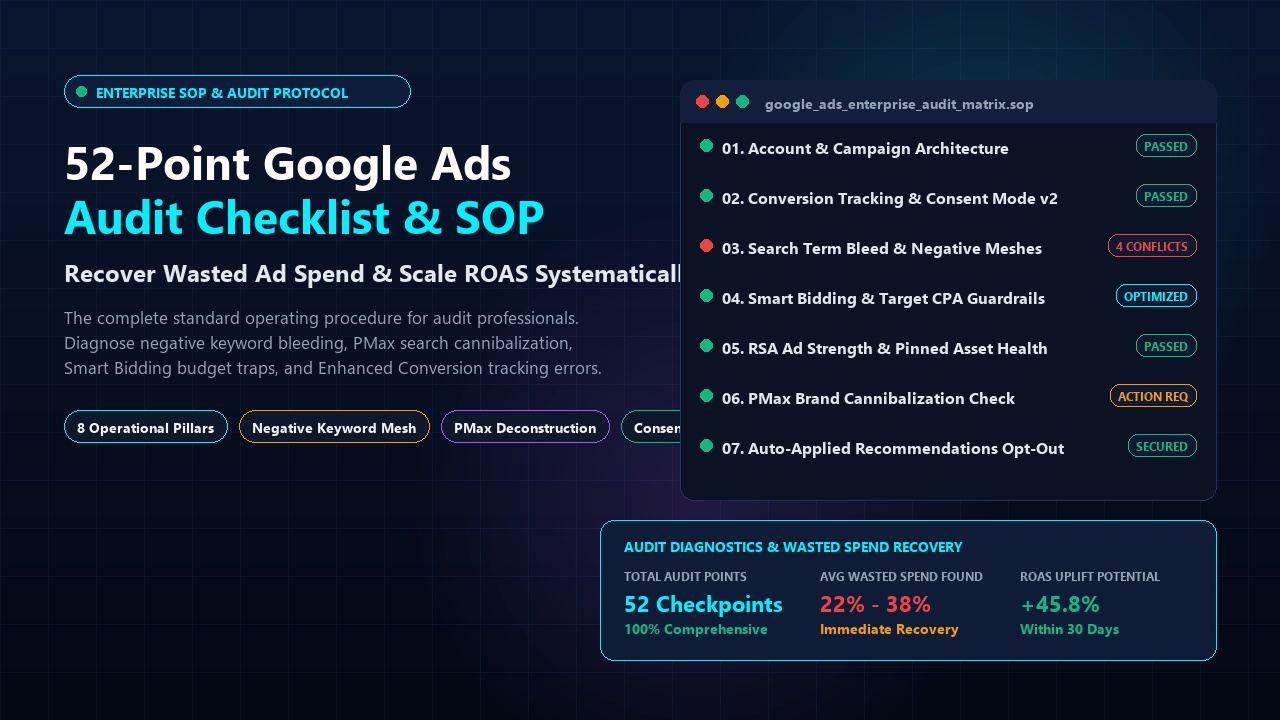
When taking over a legacy Google Ads account or troubleshooting stagnant ROAS, conducting an exhaustive technical audit is the first priority. Over 85% of active Google Ads accounts leak between 20% and 40% of their monthly budget into invisible search term bleed, misconfigured automated bid strategies, broken conversion deduplication, and Google's aggressive auto-applied recommendation defaults.
This 52-Point Google Ads Audit Checklist & Standard Operating Procedure (SOP) is the exact operational framework used by senior media buyers to audit 7- and 8-figure accounts. Organized across 8 mission-critical operational pillars, this checklist identifies every hidden point of failure and provides immediate remediation protocols.
Table of Contents
- 1. Audit Preparation: Access & Change History Protocol
- Phase 1: Account Structure & Campaign Settings (Points 1–7)
- Phase 2: Conversion Tracking & Data Hygiene (Points 8–14)
- Phase 3: Search Terms & Negative Keyword Meshes (Points 15–22)
- Phase 4: Smart Bidding & Target Guardrails (Points 23–29)
- Phase 5: RSA Creatives & Asset Extensions (Points 30–36)
- Phase 6: Performance Max (PMax) Deconstruction (Points 37–43)
- Phase 7: Landing Page Experience & CRO (Points 44–48)
- Phase 8: Automation, Fraud & Security (Points 49–52)
- The Ongoing Audit Cadence: Weekly vs. Monthly SOP
- Frequently Asked Questions (PAA Breakdown)
1. Audit Preparation: Access & Change History Protocol
Before modifying any settings, establish a clean audit baseline. Request Read-Only access via your Manager Account (MCC). Export the past 90 days and 365 days of performance data to identify seasonal variances. Review the Change History log to pinpoint recent structural shifts, target CPA adjustments, or auto-applied recommendation executions.
Phase 1: Account Structure & Campaign Settings (Points 1–7)
| # | Checkpoint Item | Audit Standard / Best Practice | Severity |
|---|---|---|---|
| 01 | Geo-Targeting Presence vs. Interest | Ensure location settings are set strictly to "Presence: People in or regularly in your included locations". Never use "Presence or Interest", which wastes spend on international searchers researching your area. | Critical |
| 02 | Search Partners Network Opt-Out | Inspect Search Partners network segmentation. If Search Partners CPL is >30% higher than Google Search, disable it immediately. | Critical |
| 03 | Display Expansion on Search | Confirm that the Google Display Network checkbox is disabled on all Search campaigns to stop low-intent banner placement drain. | Critical |
| 04 | Language Targeting Alignment | Ensure target languages match your ad copy and landing page language. Use "All Languages" only if targeting multilingual browser setups with localized ad copy. | Medium |
| 05 | Shared Budgets vs. Dedicated Budgets | Verify that top-performing hero campaigns have dedicated budgets and are not cannibalized by experimental ad groups sharing a common pool. | Medium |
| 06 | Brand vs. Non-Brand Campaign Isolation | Brand search terms must be isolated in dedicated campaigns with separate budgets and strict negative exclusions in non-brand campaigns. | Critical |
| 07 | Ad Rotation Setting | Confirm ad rotation is set to "Optimize: Prefer best performing ads" to allow machine learning models to maximize click probability. | Low |
Phase 2: Conversion Tracking & Data Hygiene (Points 8–14)
- 08. Primary vs. Secondary Conversion Actions: Only true financial actions (purchases, qualified form leads, booked calls) must be marked as Primary. Page views and micro-conversions must be Secondary to prevent Smart Bidding from optimizing for vanity hits.
- 09. Enhanced Conversions Implementation: Verify that first-party customer data (hashed email, phone, name) is being transmitted via Google Tag Manager (GTM) for Enhanced Conversions.
- 10. Google Consent Mode v2 Verification: Ensure
analytics_storageandad_user_datasignals are passing valid consented values to maintain conversion tracking compliance. - 11. Attribution Model Sanity Check: Confirm conversion actions utilize the Data-Driven Attribution (DDA) model rather than legacy Last-Click models.
- 12. Conversion Counting Method: Ensure lead generation actions are set to count "One" conversion per click (preventing multiple form refreshes from inflating counts), while eCommerce purchases count "Every".
- 13. Conversion Window Optimization: Set click-through conversion windows to reflect your actual sales cycle (e.g., 30–60 days for B2B SaaS; 7–14 days for low-ticket impulse eCommerce).
- 14. Offline Conversion Tracking (OCT) Pipeline: For lead gen, verify that CRM stages (SQL, Closed Won) are uploading back into Google Ads via GCLID or GBRAID matching.
Phase 3: Search Terms & Negative Keyword Meshes (Points 15–22)
Search Term Waste Protocol
Sort your search term report by spend over the last 90 days. Any search term with spend exceeding 1.5x your target CPA and 0 conversions must be scrubbed immediately. Ensure negative keyword lists are built hierarchically: Universal Master List, Campaign-Level List, and Ad-Group Level exclusions.
- 15. Universal Account Negative List: Verify an account-wide list containing standard junk terms (free, crack, torrent, salary, job, hiring, open source, login, portal, stock price).
- 16. Broad Match Smart Bidding Pairings: Ensure Broad Match keywords are only used in campaigns with Smart Bidding (Target CPA or Target ROAS) and deep historical conversion data (>50 conversions/month). Never run broad match on Manual CPC.
- 17. Negative Keyword Conflicts Check: Run the automated negative keyword conflict report in Google Ads to ensure negative keywords aren't accidentally blocking your highest-converting search queries.
- 18. Competitor Brand Isolation: If bidding on competitor keywords, isolate them into a dedicated campaign with conservative bid caps and distinct negative exclusions.
- 19. Single-Word Negative Audit: Audit existing negatives to ensure broad single-word negatives (e.g., negative "marketing") aren't killing legitimate long-tail queries.
- 20. Close Variant Monitoring: Monitor exact match keywords to verify that Google's close variant matching isn't altering user intent.
- 21. Cross-Match Type Cannibalization: Ensure phrase match and exact match ad groups aren't competing for the exact same auction queries.
- 22. Zero-Impression Keyword Pruning: Pause keywords with 0 impressions over the past 180 days to maintain high Quality Score hygiene.
Phase 4: Smart Bidding & Target Guardrails (Points 23–29)
- 23. Conversion Volume Feasibility: Verify that the bid strategy generates at least 30–50 conversions per month to provide sufficient data density for Google's machine learning models.
- 24. Target CPA/ROAS Realism: Confirm that your target CPA is set within 15%–20% of your actual recent average CPA. Setting an unrealistically low target CPA chokes impression volume.
- 25. Portfolio Bid Strategy with Max CPC Cap: Use Portfolio Bid Strategies with a hard maximum CPC bid ceiling to protect against runaway algorithmic auction spikes.
- 26. Learning Phase Reset Frequency: Check that budget and target CPA changes are limited to ≤ 20% adjustments every 72 hours to prevent resetting the algorithm's learning phase.
- 27. Bid Adjustment Conflicts: Check device, demographic, and location bid adjustments. In Target CPA/ROAS, bid adjustments act as target modifiers rather than direct bid multipliers.
- 28. Value-Based Bidding Rules: Configure Google Conversion Value Rules to increase bids automatically on high-value geographic regions or high-tier audience lists.
- 29. Seasonality Adjustment Readiness: Ensure seasonality adjustment protocols are ready for flash sales or holiday promotions where conversion rates temporarily surge by >30%.
Phase 5: RSA Creatives & Asset Extensions (Points 30–36)
- 30. Active RSA Count: Maintain 1 to 2 active Responsive Search Ads per ad group. Having more than 3 RSAs fractures testing data.
- 31. Ad Strength Diagnostic: Ensure RSAs achieve at least an "Average" or "Good" Ad Strength rating by providing 12–15 diverse headlines and 4 descriptions.
- 32. Over-Pinning Trap: Avoid pinning every headline position unless legally required for compliance. Excessive pinning restricts Google's multi-armed bandit testing algorithm.
- 33. Dynamic Keyword Insertion (DKI): Utilize
{KeyWord:Default Text}sparingly in headline 1 to ensure instant relevance for search queries. - 34. Sitelink Assets & Tracking: Include a minimum of 4 active sitelinks with distinct destination URLs and two description lines per sitelink.
- 35. Callout & Structured Snippet Assets: Verify at least 4 callout assets and 2 structured snippet headers are populated across all campaigns.
- 36. Business Name & Logo Verification: Complete Google Advertiser Verification to unlock verified brand logos and business names in search snippets.
Phase 6: Performance Max (PMax) Deconstruction (Points 37–43)
- 37. Account-Level Brand Exclusions: Ensure an account-level brand exclusion list is attached to PMax to prevent the campaign from inflating ROAS on existing brand searches.
- 38. Final URL Expansion Review: Check whether Final URL Expansion is turned off, or ensure negative URL exclusion rules are applied to prevent spend on privacy policies and blogs.
- 39. Search Themes Hygiene: Review search themes in asset groups; avoid stuffing generic, broad terms that trigger low-intent traffic.
- 40. First-Party Audience Signals: Verify that customer match lists and high-intent website visitor segments are populated as audience signals.
- 41. Placement Exclusion Scripts: Run placement exclusion scripts to remove rogue mobile game apps and junk MFA (made-for-advertising) display websites.
- 42. Product Feed Title Optimization: For retail, ensure product feed titles contain brand, product type, color, size, and model numbers.
- 43. Video Asset Control: Upload high-quality horizontal, vertical, and square custom videos to prevent Google from auto-generating low-quality robotic slideshows.
Phase 7: Landing Page Experience & CRO (Points 44–48)
- 44. Keyword-to-Headline Message Match: Confirm the primary search keyword appears in the above-the-fold H1 headline of the landing page.
- 45. Mobile Page Speed & Interaction to Next Paint (INP): Verify mobile load times remain under 2.5 seconds with optimal Core Web Vitals to protect Quality Score.
- 46. Sticky Mobile CTA: Ensure a persistent, thumb-friendly call-to-action button remains visible on mobile viewports.
- 47. Form Friction Reduction: Limit initial lead capture forms to 3–5 essential fields (Name, Work Email, Phone, Company).
- 48. SSL & Trust Signals: Ensure valid HTTPS security certificates, client logos, review badges, and clear privacy policies are prominent.
Phase 8: Automation, Fraud & Security (Points 49–52)
- 49. Auto-Applied Recommendations Opt-Out: Disable all destructive auto-apply settings (especially "Add broad match keywords", "Remove redundant keywords", and "Expand your reach with Search Partners").
- 50. Mandatory 2-Step Verification: Verify that all users and MCC agency accounts have two-factor authentication enforced.
- 51. Invalid Click Monitoring: Monitor the Invalid Clicks metric weekly to identify bot surges and apply IP exclusions where necessary.
- 52. Third-Party Script Error Logs: Check Google Ads scripts for execution timeouts, broken URL alerts, and budget cap triggers.
The Ongoing Audit Cadence: Weekly vs. Monthly SOP
An audit is not a one-time event—it is an operational rhythm:
- Weekly Routine (30 mins): Review Search Terms report → Add negative keywords → Check target CPA pacing → Monitor budget spend ceilings.
- Monthly Routine (2 hours): Deep dive into Quality Score trends → Audit asset extensions → Clean PMax placements → Run negative keyword conflict reports.
- Quarterly Routine (Half-day): Re-evaluate landing page CRO → Reconcile offline CRM conversion values → Overhaul RSA copy → Refresh competitor bidding moats.
Frequently Asked Questions (PAA Breakdown)
How often should you audit a Google Ads account?
A comprehensive 52-point audit should be performed quarterly, or immediately upon taking over a new client account. Light audits (search term hygiene and budget pacing) should be executed weekly.
What is the most common reason Google Ads budgets are wasted?
The number one source of wasted spend is unmonitored broad match keywords combined with default opt-ins for the Search Partners and Display networks, which siphon up to 35% of ad spend onto irrelevant queries and junk mobile apps.
Why should I opt out of Auto-Applied Recommendations in Google Ads?
Auto-applied recommendations allow Google's automated systems to modify keyword match types, raise bids, and create responsive search ads without human review. While well-intentioned, these changes frequently cannibalize budgets and disrupt deliberate bidding strategies.